A2UI Explained: AI Agents for Interactive UI
AI-assisted, human-edited
This article was drafted with the help of large language models and reviewed by a Shine Soft Corp engineer before publication. Facts, citations, and code samples were verified against the linked sources. All opinions and editorial direction belong to the editor.
Discover A2UI, a protocol for AI agents to generate safe, interactive user interfaces, and learn how it works with various frameworks and models.
A2UI Explained: AI Agents for Interactive UIDiscover A2UI, a protocol for AI agents to generate safe, interactive user interfaces, and learn how it works with various frameworks and models.
A2UI Explained: How AI Agents Can Generate Safe, Interactive User Interfaces
A practical guide to A2UI (Agent-to-User Interface), its architecture, ecosystem, use cases, benefits, and what developers should know before adopting it.
A2UI is moving AI applications beyond text and into dynamic, interactive interfaces.
Traditional AI assistants primarily return text. Modern AI agents increasingly need to do more: display forms, cards, tables, charts, booking interfaces, dashboards, confirmation dialogs, filters, and other interactive experiences.
The problem is that allowing an AI agent to generate arbitrary HTML, JavaScript, or application code creates security, compatibility, and maintenance challenges.
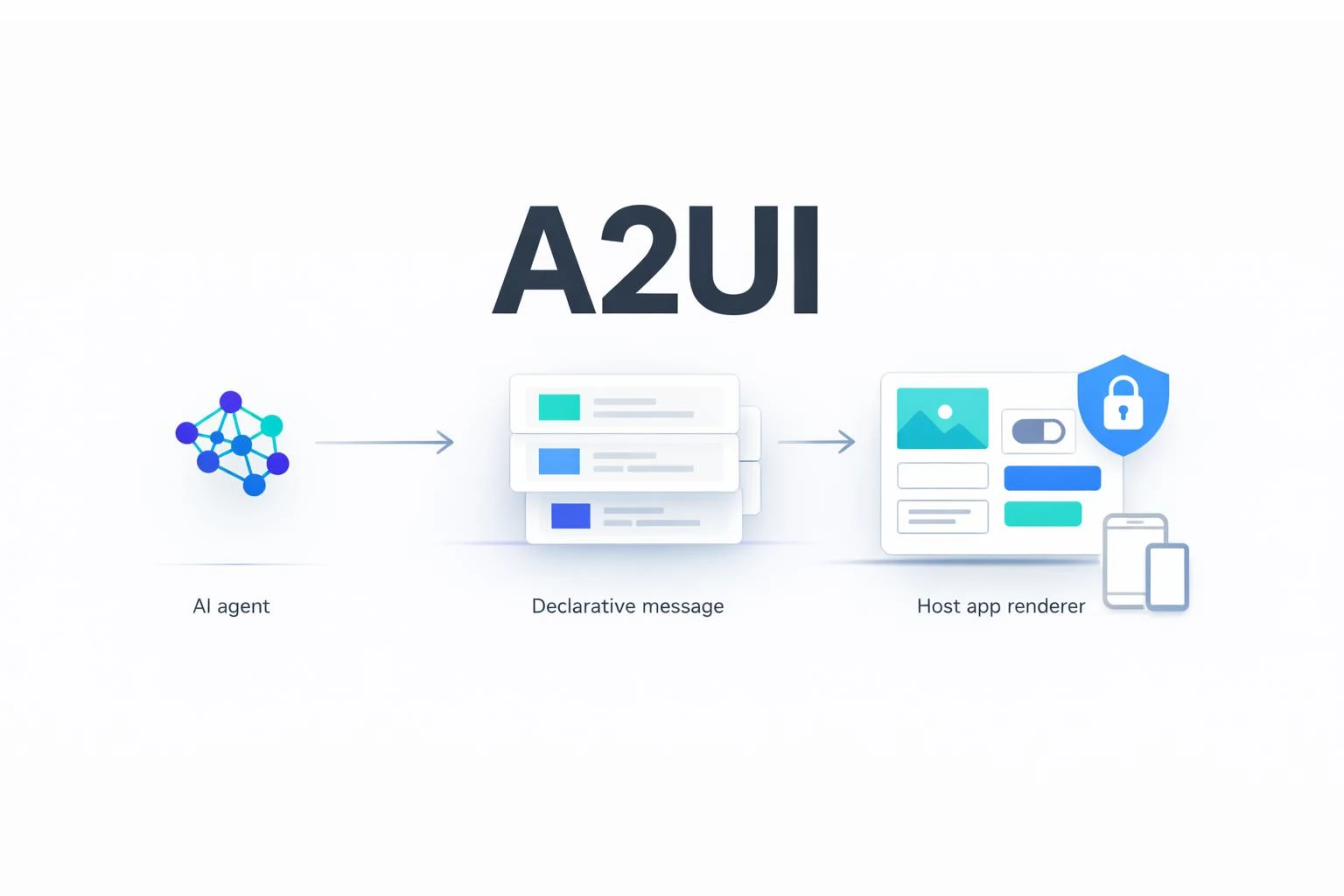
A2UI addresses this problem by giving agents a declarative language for describing UI while allowing the host application to control how that UI is actually rendered.
As of August 2026, A2UI lists v0.9.1 as the current production release, v0.9 as stable, v0.8 as legacy, and v1.0 as a candidate/release-candidate specification.
What Is A2UI?
A2UI stands for Agent-to-User Interface.
It is an open protocol and component format designed to allow AI agents to generate rich, interactive user interfaces that can be rendered by applications across web, mobile, and desktop.
Instead of asking an AI agent to generate executable UI code such as:
<button onclick="confirmBooking()">Confirm Booking</button>
the agent describes the desired interface using structured A2UI data.
Conceptually:
flowchart TD
    U[User] --> A[AI Agent]
    A --> J[A2UI JSON]
    J --> T[Transport]
    T --> R[A2UI Renderer]
    R --> C[Native UI Components]
    C --> U
The important distinction is:
The AI describes the interface. The application decides how the interface is rendered.
This makes A2UI fundamentally different from asking an LLM to generate arbitrary HTML/JavaScript.
A2UI describes itself as a declarative UI format rather than executable code. The host application maintains a catalog of trusted components that the agent is allowed to use.
Why Do We Need A2UI?
Consider a traditional AI chatbot.
A user asks:
"Find me a flight from Ahmedabad to London next Friday."
A conventional AI assistant might respond:
I found three flights:

1. Air India - 10:30 PM - ₹72,000
2. Emirates - 4:20 AM - ₹81,000
3. Qatar Airways - 3:15 AM - ₹76,000
The user still has to read the response and decide what to do next.
An agentic UI could instead generate:
┌─────────────────────────────────────────┐
│ Flights to London                       │
│                                         │
│ ○ Air India                             │
│   10:30 PM → 06:15 AM                   │
│   ₹72,000                                │
│                                         │
│ ○ Emirates                              │
│   04:20 AM → 11:05 AM                   │
│   ₹81,000                                │
│                                         │
│ ○ Qatar Airways                         │
│   03:15 AM → 10:10 AM                   │
│   ₹76,000                                │
│                                         │
│          [ Continue ]                    │
└─────────────────────────────────────────┘
The AI has effectively generated an interface appropriate to the user's request.
This is the problem A2UI is designed to solve.
A2UI Is Not a UI Framework
This is one of the most important things to understand.
A2UI is not:
- React
- Angular
- Flutter
- HTML
- CSS
- JavaScript
- a design system
- an AI model
- an agent framework
Instead, A2UI defines a protocol/data representation that can be interpreted by renderers.
For example:
flowchart TD
    A2UI[A2UI Protocol] --> R1[React Renderer]
    A2UI --> R2[Angular Renderer]
    A2UI --> R3[Lit Web Components]
    A2UI --> R4[Flutter Renderer]

    R1 --> WEB1[Web Application]
    R2 --> WEB2[Web Application]
    R3 --> WEB3[Web Application]
    R4 --> MOB[Mobile / Desktop Application]
                 ┌───────────────┐
                 │   AI Agent    │
                 └───────┬───────┘
                         │
                         │ A2UI JSON
                         ▼
                 ┌───────────────┐
                 │   Transport   │
                 └───────┬───────┘
                         │
             ┌───────────┼───────────┐
             ▼           ▼           ▼
          React        Angular     Flutter
          Renderer     Renderer     Renderer
             │           │           │
             ▼           ▼           ▼
            Web         Web       Mobile/Desktop
A2UI currently documents maintained renderers for React, Lit/Web Components, Angular, and Flutter, with additional community implementations.
Who Created A2UI?
A2UI was created by Google and is developed as an open-source project with contributions from CopilotKit and the wider open-source community.
The project is licensed under Apache 2.0 and is actively developed on GitHub.
This is important because A2UI is not simply a proprietary UI feature locked to one AI model.
The protocol is designed to be used by different agents, models, frameworks, transports, and client applications.
What Is A2UI Backed By?
A2UI sits within a broader agent ecosystem.
It can work with:
- Google ADK
- A2A
- AG-UI
- MCP
- LangGraph
- Mastra
- CrewAI
- Strands
- custom agents
- custom LLM backends
The A2UI documentation explicitly describes integration with agent frameworks and transports rather than requiring one particular AI model.
This gives the architecture an important separation:
AI Model
    ↓
Agent
    ↓
A2UI
    ↓
Transport
    ↓
Renderer
    ↓
Application UI
You can therefore change the underlying AI model without necessarily changing the entire UI architecture.
A2UI vs AI Model
A common misconception is:
"A2UI is a Google AI technology."
Not exactly.
Google created and maintains the protocol, but A2UI is designed to be model-agnostic.
An LLM capable of generating the required JSON can potentially generate A2UI messages.
For example:
Gemini
Claude
OpenAI models
Mistral
Llama
Other JSON-capable models
        ↓
   A2UI messages
The actual quality depends on the model's ability to follow the A2UI schema, generate valid structures, and correctly understand the available component catalog.
How Does A2UI Work?
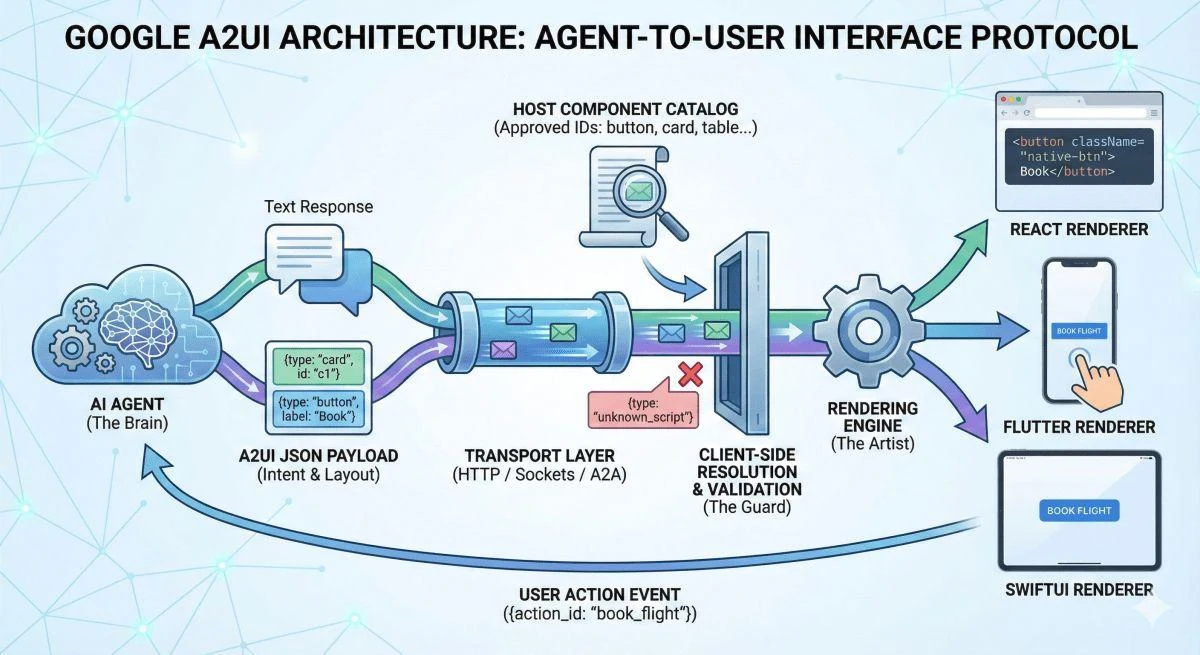
A typical architecture looks like this:
flowchart TD
    U[User]

    U --> FE[Frontend Application]

    FE --> TR[Agent Communication / Transport]

    TR --> AG[AI Agent]

    AG --> LLM[LLM]
    AG --> TOOLS[Tools & APIs]
    AG --> DATA[Business Data]
    AG --> MEM[Agent Memory]

    AG --> A2UI[A2UI Messages]

    A2UI --> R[A2UI Renderer]

    R --> CAT[Trusted Component Catalog]

    CAT --> UI[Native Application UI]

    UI --> U
┌─────────────────────┐
│       User          │
└──────────┬──────────┘
           │
           ▼
┌─────────────────────┐
│    AI Agent         │
│                     │
│ LLM + Tools + Data  │
└──────────┬──────────┘
           │
           │ A2UI messages
           ▼
┌─────────────────────┐
│     Transport       │
│                     │
│ A2A / AG-UI / MCP   │
│ WebSocket / SSE     │
└──────────┬──────────┘
           │
           ▼
┌─────────────────────┐
│   A2UI Renderer     │
│                     │
│ React / Lit /       │
│ Angular / Flutter   │
└──────────┬──────────┘
           │
           ▼
┌─────────────────────┐
│ Native Components   │
│                     │
│ Card / Button /     │
│ Form / Text / etc.  │
└─────────────────────┘
A2UI itself is transport-agnostic: anything capable of delivering JSON messages can theoretically carry the protocol.
What Is a Surface?
A surface is essentially an area in which A2UI renders a UI.
Think of it as a UI workspace.
For example:
Surface: "booking"

┌─────────────────────────────┐
│ Booking Form                │
│                             │
│ Destination: [ London    ]  │
│ Date:        [ 20 Aug    ]  │
│ Passengers:  [ 2         ]  │
│                             │
│        [ Search Flights ]   │
└─────────────────────────────┘
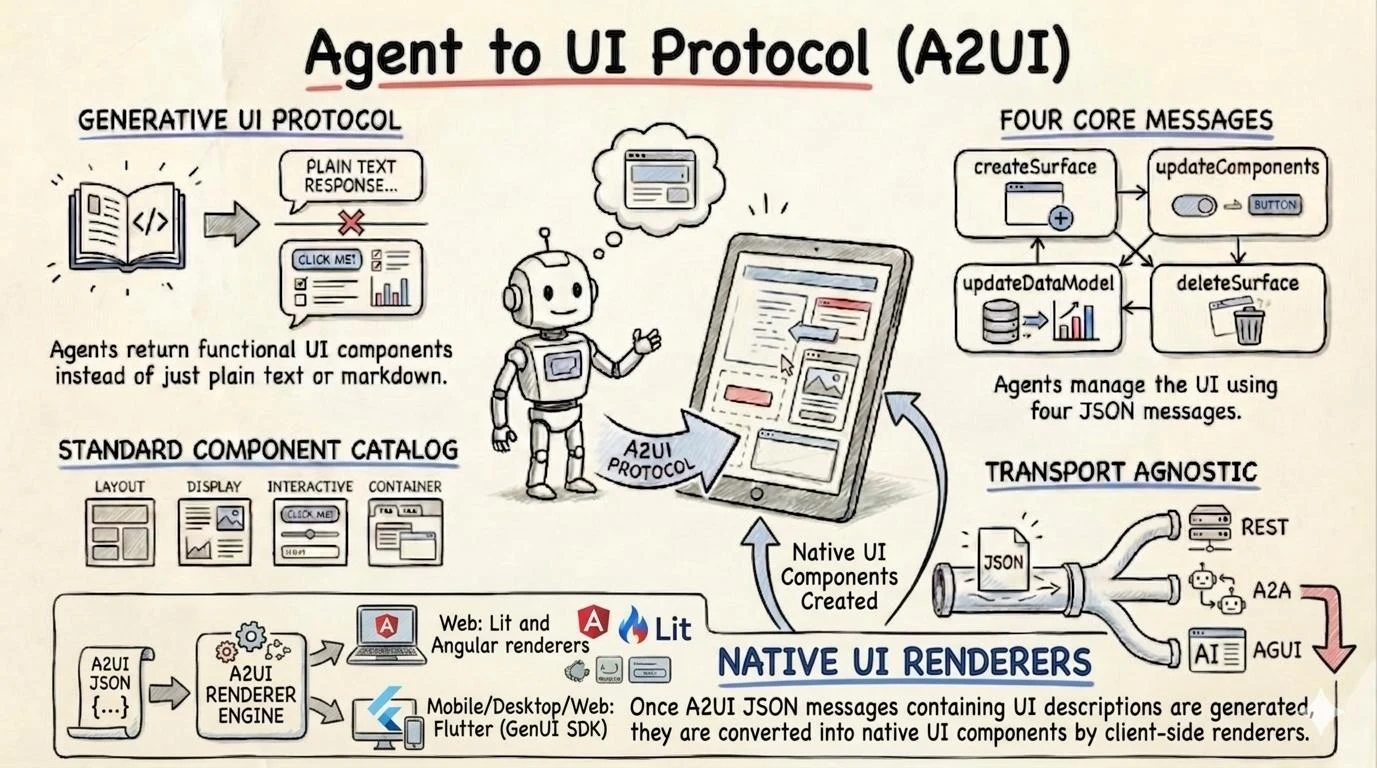
An agent can create a surface, update its components, update its data model, and eventually delete the surface.
What Are A2UI Components?
Components are the building blocks of the interface.
Depending on the catalog, an agent can work with components such as:
- Text
- Button
- Card
- Row
- Column
- TextField
- Checkbox
- Date/time input
- Lists
- Images
- Selection controls
- containers
- custom components
The exact available component set depends on the catalog supported by the client.
This is an important security mechanism.
The agent does not automatically get permission to execute arbitrary UI code.
Instead:
Client Catalog

Allowed:
✓ Button
✓ Text
✓ Card
✓ TextField
✓ DatePicker
✓ Table

Not allowed:
✗ arbitrary JavaScript
✗ arbitrary HTML
✗ arbitrary executable code
The A2UI documentation describes this as a trusted component catalog model.
What Is a Component Catalog?
A catalog is effectively a contract between the agent and the renderer.
It tells the agent:
"These are the UI components you are allowed to request."
For example:
Catalog
│
├── Text
├── Button
├── Card
├── TextField
├── Checkbox
├── DatePicker
└── List
The application owns the actual implementation.
For example:
A2UI Button
      ↓
Your React Button
      ↓
Your CSS
      ↓
Your Design System
This is particularly valuable for enterprise applications because companies can maintain a consistent design system while allowing AI agents to dynamically compose interfaces.
How Does Data Binding Work?
A2UI separates:
- UI structure
- application data
For example, a component can refer to:
/user/name
rather than embedding the actual value directly into the component definition.
Conceptually:
flowchart TD
    AG[AI Agent] --> UI[A2UI Component Definition]

    UI --> PATH[Data Binding Path]

    PATH --> MODEL[Application Data Model]

    MODEL --> VALUE[Current Data Value]

    VALUE --> RENDER[Renderer]

    RENDER --> SCREEN[Rendered UI]

    MODEL --> UPDATE[Data Update]

    UPDATE --> RENDER
{
  "text": {
    "path": "/user/name"
  }
}
If the data changes:
/user/name
from:
"Rahul"
to:
"Rahul Sharma"
the UI can update without rebuilding the entire interface.
A2UI uses JSON Pointer-style paths and dynamic values for data binding.
Progressive Rendering
One of the most interesting aspects of A2UI is progressive UI rendering.
Traditional AI applications often wait for the complete response:
User
 ↓
Agent
 ↓
LLM
 ↓
Wait...
 ↓
Complete response
 ↓
Render UI
A2UI can instead stream UI updates:
Agent
 ↓
Create surface
 ↓
Render title
 ↓
Render card
 ↓
Render form
 ↓
Render data
 ↓
Render actions
The user can see the interface being constructed while the agent is working.
This can significantly improve perceived responsiveness for agentic applications.
How Do Developers Consume A2UI?
There are three main approaches.
1. Build an A2UI Host Application
If you are building the frontend yourself, integrate an A2UI renderer.
For example, the official documentation provides React, Angular, Lit and Flutter paths.
For React, the documented setup includes:
npm install @a2ui/react @a2ui/web_core
For Angular:
npm install @a2ui/angular @a2ui/web_core
The renderer then receives A2UI messages and converts them into application components.
2. Build an AI Agent That Produces A2UI
The other side is the backend.
Your agent needs to know:
- the A2UI schema
- available components
- component properties
- actions
- data model
- validation requirements
The conceptual workflow is:
User request
      ↓
Agent
      ↓
LLM prompt
      ↓
Generate A2UI JSON
      ↓
Validate
      ↓
Stream to client
A2UI v0.9 specifically promotes a prompt → generate → validate loop because the richer schema is intended to be embedded into the model's context rather than relying exclusively on structured-output constraints.
3. Use A2UI Through an Existing Agent Framework
Developers don't necessarily need to build the complete infrastructure themselves.
A2UI documents integrations through:
- AG-UI
- A2A
- MCP
- Google ADK
- other agent frameworks
For example, AG-UI can act as the transport/runtime layer while A2UI describes the UI payload.
The important relationship is:
AG-UI carries the interaction; A2UI describes the UI.
They are complementary rather than competing technologies.
A2UI + MCP
Another interesting combination is A2UI + Model Context Protocol (MCP).
An MCP server can return A2UI content through:
- MCP resources
- MCP tools
The client can identify A2UI payloads using:
application/a2ui+json
and route them to an A2UI renderer.
Conceptually:
AI Agent
   ↓
MCP Tool
   ↓
A2UI JSON
   ↓
MCP Client
   ↓
A2UI Renderer
   ↓
Interactive UI
This opens interesting possibilities for AI tools that don't merely return data but return usable interfaces around that data.
A2UI + A2A
A2A is focused on communication between agents.
A2UI is focused on communication of agent-generated UI.
They can therefore work together:
Agent A
   ↓
A2A
   ↓
Agent B
   ↓
A2UI
   ↓
User Interface
A2UI messages can be carried as A2A data parts and identified using the application/a2ui+json MIME type.
This becomes particularly interesting in multi-agent enterprise architectures.
Who Can Use A2UI?
A2UI is useful for several categories of developers and organizations.
AI Application Developers
If you're building:
- AI assistants
- agentic applications
- AI copilots
- generative UI
- conversational applications
A2UI can allow the assistant to move beyond text.
SaaS Companies
SaaS products can allow agents to dynamically construct interfaces.
For example:
CRM Agent

"Show me customers who haven't purchased
anything in 90 days."

        ↓

AI generates

┌────────────────────────────────────┐
│ Dormant Customers                  │
├────────────────────────────────────┤
│ Customer     Last Purchase   Value │
│ ABC Ltd      104 days        ₹1.2L │
│ XYZ Corp     127 days        ₹3.4L │
│ Acme Ltd     142 days        ₹0.8L │
├────────────────────────────────────┤
│ [Create Campaign] [Export]         │
└────────────────────────────────────┘
The interface can be generated based on the user's intent.
Enterprise Applications
A2UI is particularly interesting for enterprise systems such as:
- CRM
- ERP
- HRMS
- helpdesk
- finance
- procurement
- inventory
- analytics
- customer support
Imagine asking:
"Show me overdue invoices above ₹1 lakh and let me follow up with them."
Instead of returning a paragraph, an agent could produce:
Overdue Invoices

☑ ABC Ltd       ₹4,20,000
☑ XYZ Pvt Ltd   ₹2,10,000
☐ Acme Ltd      ₹1,25,000

[Send Reminder]
[Create Task]
[Export]
The user can interact directly with the result.
Customer Support
Traditional:
User: I want to change my subscription.
AI: You currently have the Pro plan...
A2UI:
Current Plan
────────────────────
Pro

Users:        10
Storage:      500 GB
Monthly:      ₹2,499

[Upgrade]
[Downgrade]
[Cancel]
The assistant becomes an actual interface rather than merely a conversational layer.
E-Commerce
A shopping agent could dynamically generate:
Recommended Laptops

┌─────────────┐
│ MacBook     │
│ ₹1,29,900   │
│             │
│ [Compare]   │
│ [Buy]       │
└─────────────┘

┌─────────────┐
│ ThinkPad    │
│ ₹98,000     │
│             │
│ [Compare]   │
│ [Buy]       │
└─────────────┘
The UI can be based on what the user asks rather than being restricted to a fixed chatbot response format.
Travel Applications
A travel agent could dynamically generate:
- destination cards
- flight selection
- hotel comparison
- date selection
- passenger forms
- itinerary
- booking confirmation
This is a natural fit for agentic workflows because every request can require a different combination of UI components.
Banking and Financial Applications
Potential applications include:
- transaction search
- expense analysis
- payment confirmation
- account summaries
- investment dashboards
- loan calculators
- financial forms
However, highly regulated applications should still apply strict validation, authorization, audit logging, and server-side business rules.
A2UI does not replace your security architecture.
It only provides the UI representation.
Internal Business Tools
This may actually be one of the strongest practical use cases.
Imagine an employee asking:
"Show me employees who have not completed their compliance training."
Instead of:
There are 27 employees...
the agent can generate:
Compliance Training

27 Employees Pending

[Select All]

☑ John
☑ Sarah
☐ Michael
☐ David

[Send Reminder]
[Create Task]
The AI becomes an operational interface.
What Are the Biggest Benefits?
1. AI Can Generate Interfaces
Instead of generating only text:
AI → Text
you can have:
AI → UI
This is a major shift in agent design.
2. Safer Than Arbitrary Code Generation
A2UI uses declarative UI descriptions.
The agent does not need permission to execute arbitrary JavaScript in the client.
The host application controls the components available through its catalog.
3. Host Controls the Design
Your application can maintain:
Brand
Typography
Colors
Spacing
Buttons
Forms
Accessibility
Responsive behavior
The agent only chooses from approved building blocks.
This prevents your AI-generated UI from becoming visually inconsistent.
4. Cross-Platform Potential
The same conceptual A2UI representation can be rendered using different client implementations.
For example:
flowchart LR
    AG[AI Agent] --> A2UI[A2UI]

    A2UI --> REACT[React Renderer]
    A2UI --> ANGULAR[Angular Renderer]
    A2UI --> LIT[Lit Renderer]
    A2UI --> FLUTTER[Flutter Renderer]

    REACT --> WEB1[Web]
    ANGULAR --> WEB2[Web]
    LIT --> WEB3[Web Components]
    FLUTTER --> MOBILE[Mobile / Desktop]
             A2UI
               │
       ┌───────┼────────┐
       ▼       ▼        ▼
     React   Angular   Flutter
       │       │        │
      Web     Web     Mobile
Current maintained renderers include React, Angular, Lit and Flutter.
5. Progressive Rendering
Interfaces can be streamed incrementally instead of waiting for the entire response.
This is valuable for slow or complex agent workflows.
6. Better User Experience
Instead of asking users to translate AI responses into actions:
AI response
   ↓
User understands
   ↓
User finds UI
   ↓
User performs action
you can potentially provide:
AI response
   ↓
Interactive UI
   ↓
User action
That can dramatically reduce friction.
A2UI Legacy vs New Versions
This is one area developers should pay close attention to.
A2UI has evolved substantially between v0.8 and v0.9.
The official project currently lists:
| Version | Status | Main Direction |
|---|---|---|
| v0.8 | Legacy | Structured Output first |
| v0.9 | Stable | Prompt-first |
| v0.9.1 | Current | Production release in v0.9 family |
| v1.0 | Candidate | Next-generation protocol |
v0.8 vs v0.9
The biggest change is philosophical.
A2UI v0.8
Designed primarily around:
Structured Output / Function Calling
The protocol was optimized for LLMs capable of strict structured output.
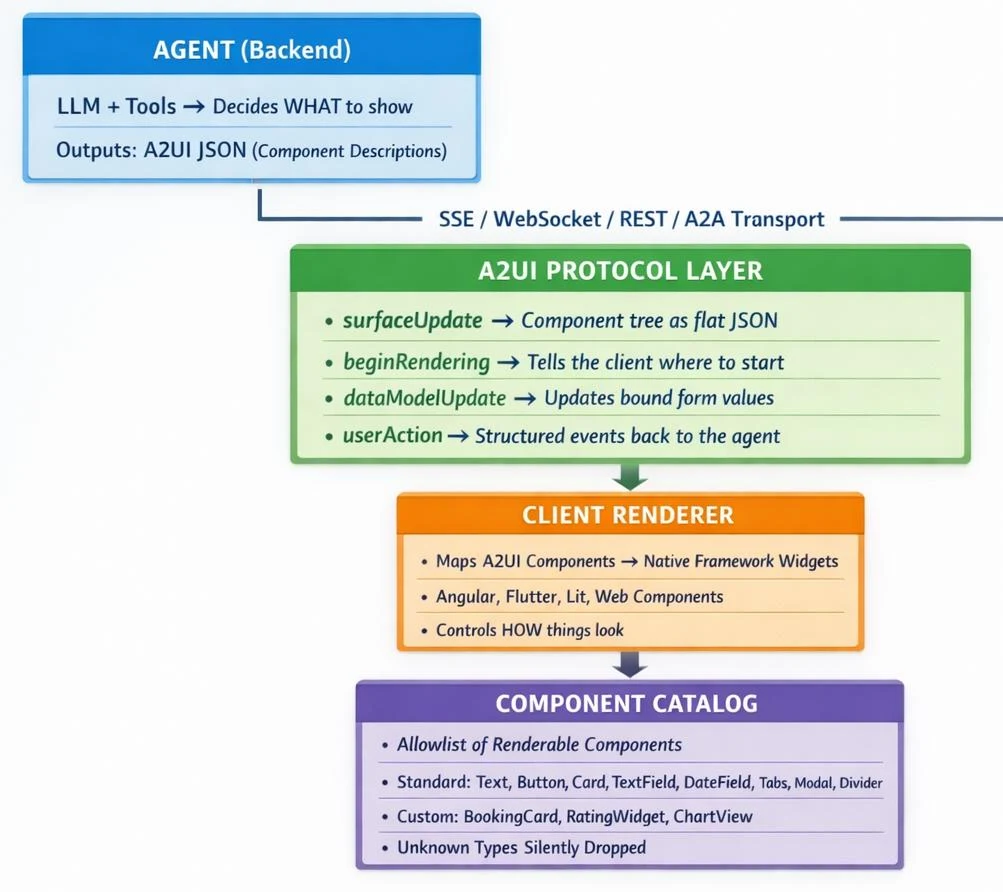
It used structures such as:
surfaceUpdate
dataModelUpdate
beginRendering
deleteSurface
The component model also used key-based wrappers.
A2UI v0.9
The philosophy changed to:
Prompt First
Instead of relying primarily on strict structured-output mechanisms, the schema is designed to be embedded into the LLM prompt along with examples.
The message model changed to:
createSurface
updateComponents
updateDataModel
deleteSurface
The evolution guide describes this as a fundamental shift from "Structured Output First" to "Prompt First."
Major v0.8 → v0.9 Differences
| Area | v0.8 | v0.9 |
|---|---|---|
| Philosophy | Structured Output First | Prompt First |
| Surface creation | beginRendering |
createSurface |
| Component updates | surfaceUpdate |
updateComponents |
| Data updates | dataModelUpdate |
updateDataModel |
| Component representation | Key-based wrapper | Property discriminator |
| Data model | Array-oriented structure | Standard JSON objects |
| Data binding | dataBinding / literalString |
path / native JSON types |
| Catalog | Separate catalogs | Unified catalog |
| Validation | Basic schema | Validation feedback loop |
| Client state sync | More implicit | Explicit mechanisms |
| Functions | Limited model | Generalized client-side functions |
What About v0.9.1?
For developers starting a new implementation today, v0.9.1 is the important version to evaluate.
The project currently identifies v0.9.1 as its current production release, with v0.8 maintained as legacy and v1.0 as a candidate.
v0.9.1 is essentially the current production member of the v0.9 protocol family rather than a completely different architecture.
The current specification also standardizes the:
application/a2ui+json
MIME type.
What Is Coming in A2UI v1.0?
The v1.0 candidate introduces additional protocol capabilities.
One important addition is:
actionResponse
This enables more robust client-to-server synchronous RPC-style interaction.
The current A2UI documentation identifies v1.0 as a candidate/release candidate rather than the current production version.
Therefore, developers should distinguish between:
Production today:
v0.9.1

Future / candidate:
v1.0
For production systems, adopting a candidate specification requires careful consideration of compatibility and future migration.
Should You Use v0.8?
For a new project:
Generally, no.
v0.8 is explicitly identified as legacy.
If you already have a v0.8 implementation, migration to the v0.9 family is the more appropriate direction.
The official evolution guide exists specifically to explain the migration from v0.8.1 to v0.9.
A2UI Compared With Traditional UI
| Traditional UI | A2UI |
|---|---|
| Developer defines UI | Agent can compose UI |
| UI mostly predetermined | UI can be generated dynamically |
| Business logic decides screen | Agent can select presentation |
| Static component hierarchy | Incrementally generated components |
| User navigates screens | Agent can bring UI to the conversation |
| Code defines behavior | Declarative protocol describes UI |
| Usually one frontend framework | Multiple renderer possibilities |
This doesn't mean traditional UI disappears.
Instead, A2UI can become another layer on top of an existing application architecture.
A2UI vs Generating HTML
A tempting approach is:
LLM
 ↓
HTML
 ↓
Browser
But this introduces significant problems.
The model could generate:
- invalid HTML
- unexpected scripts
- inconsistent styles
- unsafe JavaScript
- components your application doesn't support
- UI that doesn't match your design system
A2UI instead follows:
LLM
 ↓
A2UI
 ↓
Validation
 ↓
Trusted component catalog
 ↓
Native renderer
The host remains in control.
A2UI vs MCP Apps
A2UI and MCP Apps solve related but different problems.
| A2UI | MCP Apps | |
|---|---|---|
| UI model | Declarative component blueprint | HTML application/resource |
| Rendering | Native host components | Sandboxed iframe |
| Host styling | Host controls | Remote app largely controls |
| Cross-platform | Strong | More web-oriented |
| Security model | Trusted declarative components | Sandbox isolation |
| Dynamic generation | Designed for it | More application/resource oriented |
The A2UI documentation describes MCP Apps as a complementary approach rather than a direct replacement.
A2UI vs AG-UI
This distinction is extremely important.
A2UI is the UI representation.
AG-UI is a communication/interaction protocol.
Think of:
AG-UI = How the agent and application communicate

A2UI = What UI the agent wants the application to render
They can work together.
Agent
  │
  │ AG-UI
  ▼
Frontend
  │
  │ A2UI payload
  ▼
A2UI Renderer
  │
  ▼
UI
The official documentation explicitly positions them as complementary technologies.
Where Does A2UI Fit in an AI Architecture?
A modern agent application might look like:
                    ┌───────────────┐
                    │     User      │
                    └───────┬───────┘
                            │
                            ▼
                  ┌──────────────────┐
                  │   Frontend App   │
                  └────────┬─────────┘
                           │
                    AG-UI / A2A / MCP
                           │
                           ▼
                  ┌──────────────────┐
                  │   AI Agent       │
                  ├──────────────────┤
                  │ LLM              │
                  │ Tools            │
                  │ Memory           │
                  │ Business Logic   │
                  └────────┬─────────┘
                           │
                       A2UI JSON
                           │
                           ▼
                  ┌──────────────────┐
                  │ A2UI Renderer    │
                  └────────┬─────────┘
                           │
                           ▼
                  ┌──────────────────┐
                  │ Native UI        │
                  └──────────────────┘
This separation is powerful because each layer has a clear responsibility.
A Practical Example for a CRM
Imagine a CRM with an AI sales agent.
User:
"Show me my highest-value leads that haven't been contacted this week."
The agent queries the CRM database.
Instead of returning plain text, it generates an A2UI surface:
┌──────────────────────────────────────────────┐
│ High-Value Leads                             │
│                                              │
│ 12 leads require attention                   │
│                                              │
│ ☑ ABC Corporation      ₹12,00,000            │
│   Last contact: 11 days ago                  │
│                                              │
│ ☑ XYZ Industries       ₹9,50,000             │
│   Last contact: 8 days ago                   │
│                                              │
│ ☐ Acme Pvt Ltd         ₹7,80,000             │
│   Last contact: 6 days ago                   │
│                                              │
│ [Create Follow-up Tasks] [Export]            │
└──────────────────────────────────────────────┘
The CRM's own renderer determines:
- colors
- typography
- spacing
- buttons
- accessibility
- responsive layout
The agent determines:
- what information matters
- which components are useful
- what actions should be offered
This is a very compelling architecture for AI-powered SaaS.
What Does This Mean for SaaS Developers?
A2UI potentially changes the role of the application frontend.
Traditional SaaS:
Developer
    ↓
Build every screen
    ↓
User navigates screens
Agentic SaaS:
Developer
    ↓
Build trusted components + business capabilities
    ↓
Agent decides which UI composition is useful
    ↓
User interacts directly
The developer still controls the product.
But instead of building every possible combination of screens, developers can provide reusable components and let agents compose them according to context.
What You Need to Build
If you want to implement A2UI in your own SaaS application, think about five layers.
1. Component Catalog
Define what the agent can render.
Text
Card
Table
Form
Button
Chart
Modal
DatePicker
2. Renderer
Implement the mapping:
A2UI Component
      ↓
Your Component
For example:
A2UI Button
      ↓
<YourButton />
3. Agent
Your AI agent needs to understand:
Available components
Component properties
Actions
Data model
Business rules
4. Transport
Choose how messages travel:
A2A
AG-UI
MCP
SSE
WebSocket
HTTP
Custom transport
A2UI itself does not force a single transport.
5. Validation and Security
Never assume:
LLM output = trusted output
Instead:
flowchart LR
    LLM[LLM / AI Agent] --> JSON[A2UI JSON]

    JSON --> VALIDATE[Schema Validation]

    VALIDATE --> ALLOW[Component Allowlist]

    ALLOW --> AUTH[Business Authorization]

    AUTH --> RENDER[A2UI Renderer]

    RENDER --> UI[Trusted Native UI]

    JSON -.->|No arbitrary JavaScript| BLOCK[Blocked]
    BLOCK --> X[Not Executed]
LLM
 ↓
A2UI JSON
 ↓
Schema validation
 ↓
Component allowlist
 ↓
Business authorization
 ↓
Renderer
A2UI's declarative model helps reduce the attack surface, but it does not eliminate the need for application-level authorization and validation.
For example, an agent might generate:
[Delete Customer]
The renderer can display the button, but the backend must still verify:
Does this user have permission to delete this customer?
Who Should NOT Immediately Adopt A2UI?
A2UI is not automatically useful for every application.
You probably don't need it if your application:
- has mostly static pages
- has predictable workflows
- doesn't use AI agents
- doesn't need dynamic UI
- already has simple chatbot responses
- requires extremely deterministic interfaces
For a conventional CRUD application, standard React/Angular/Vue development may remain the better choice.
A2UI becomes more interesting when:
AI + Dynamic workflow + Interactive UI
come together.
The Sweet Spot for A2UI
The strongest use case is probably:
AI agents that need to perform real work with users rather than merely answer questions.
Examples:
AI Sales Agent
AI Support Agent
AI Travel Agent
AI Finance Agent
AI HR Agent
AI Procurement Agent
AI CRM Agent
AI Analytics Agent
AI Operations Agent
If the agent needs to say:
"Here is something you can interact with."
A2UI becomes interesting.
Why This Matters for the Future of AI Applications
The first generation of AI applications was largely:
Chat
 ↓
Text
The next generation is increasingly:
User
 ↓
Agent
 ↓
Reasoning
 ↓
Tools
 ↓
Dynamic UI
 ↓
Action
The interface itself becomes part of the agent's response.
Instead of:
"Here are the results."
the agent can say:
"Here are the results — and here's the interface you need to act on them."
That is the bigger idea behind A2UI.
A2UI in One Diagram
                 USER
                   │
                   ▼
            ┌──────────────┐
            │  AI AGENT    │
            │              │
            │ LLM + Tools  │
            └──────┬───────┘
                   │
                   │
             A2UI Messages
                   │
                   ▼
            ┌──────────────┐
            │  TRANSPORT   │
            │              │
            │ A2A / AG-UI  │
            │ MCP / SSE    │
            └──────┬───────┘
                   │
                   ▼
            ┌──────────────┐
            │ A2UI CLIENT  │
            │              │
            │ Validation   │
            │ Data Model   │
            │ Actions      │
            └──────┬───────┘
                   │
                   ▼
            ┌──────────────┐
            │   CATALOG    │
            │              │
            │ Button       │
            │ Card         │
            │ Form         │
            │ Table        │
            └──────┬───────┘
                   │
                   ▼
          ┌──────────────────┐
          │ NATIVE UI        │
          │                  │
          │ React / Angular  │
          │ Lit / Flutter    │
          └──────────────────┘
Should Developers Start Learning A2UI Now?
Yes — but treat it as an emerging protocol, not a completely mature replacement for conventional frontend development.
The project itself currently describes A2UI as being in an early-stage public-preview phase, with the specification and implementations still evolving.
The practical approach is:
For new AI-native applications
Start experimenting with:
A2UI v0.9.1
because it is the current production release.
For existing v0.8 implementations
Plan migration toward the v0.9 family.
For experimental/future architecture
Monitor:
A2UI v1.0
but avoid making a candidate specification your only production dependency until its status is finalized.
Our View: Where A2UI Could Become Extremely Powerful
At ShineSoft, we see an especially interesting opportunity around AI-powered enterprise software.
Consider a future CRM where the user doesn't need to know which module to open.
Instead of:
Dashboard
  ↓
Leads
  ↓
Filter
  ↓
Status
  ↓
Open Lead
  ↓
Create Task
the user could simply say:
"Show me my high-value leads that need follow-up and create tasks for the ones I select."
The agent can:
Understand intent
       ↓
Query CRM
       ↓
Generate A2UI
       ↓
Display leads
       ↓
User selects records
       ↓
Create tasks
       ↓
Update UI
The application still owns the business logic and permissions.
The AI becomes the intelligent interaction layer.
That is where technologies such as A2UI become much more than "AI-generated forms."
They become a foundation for agentic application interfaces.
Final Takeaway
A2UI is best understood as:
A standardized way for AI agents to describe interactive UI without sending executable UI code.
Its architecture separates:
Agent intelligence
       ↓
UI description
       ↓
Transport
       ↓
Trusted renderer
       ↓
Native application UI
Its biggest advantages are:
- Dynamic UI generation
- Cross-platform rendering
- Progressive streaming
- Declarative rather than executable UI
- Host-controlled component catalogs
- Better security boundaries
- Integration with modern agent ecosystems
- Potentially much better agent UX
The current production direction is A2UI v0.9.1, while v1.0 is a candidate and v0.8 is legacy.
For developers building the next generation of AI-powered SaaS, CRM, ERP, support, analytics, or workflow products, A2UI is worth watching closely.
The fundamental shift is simple:
Old AI:

User → AI → Text

Agentic UI:

User
  ↓
AI Agent
  ↓
Reasoning + Tools
  ↓
A2UI
  ↓
Interactive UI
  ↓
User Action
  ↓
Business System
AI is no longer limited to telling users what to do.
With protocols such as A2UI, agents can increasingly build the interface through which users actually get the work done.
Official Resources
- A2UI Official Website
- A2UI Protocol Documentation
- A2UI v0.8 → v0.9 Evolution Guide
- A2UI GitHub Repository
- A2UI Quickstart
- A2UI Renderer Documentation
- A2UI + MCP Guide
Frequently Asked Questions
Is A2UI an AI model? No. It is a protocol/data format for describing agent-generated UI.
Is A2UI only for Google Gemini? No. It is designed to be model-agnostic.
Does A2UI replace React or Angular? No. React, Angular, Lit and Flutter can act as renderers for A2UI.
Does A2UI execute AI-generated JavaScript? No. Its core approach is declarative UI rather than arbitrary executable code.
Can A2UI work with MCP? Yes. A2UI provides documented MCP integration paths.
Can A2UI work with A2A? Yes. A2UI can be carried through A2A.
Can I use A2UI with my own backend? Yes. A2UI is transport-agnostic and can be integrated into custom agent architectures.
Should I use v0.8 for a new project? Generally no. v0.8 is now legacy; v0.9.1 is the current production release.
Is v1.0 production-ready? The project currently identifies v1.0 as a candidate, while v0.9.1 remains the current production release.
Is A2UI useful without AI? It can be, but its primary value is for dynamic, agent-generated interfaces.
Is A2UI a UI framework?
Live results
What is A2UI primarily designed for?
Live results
How does A2UI improve security?
Live results